3.06 Perubahan / Penambahan Notification Type
dilakukan Administrator SAP 
Overview of Notofication Type, Processing
Define Notification Types, Processing
New entries, Input New Notification type
Contoh di tab Typ : input N4
Notif.cat input : Improvement Mtc Req
Save
3.07 Perubahan / Penambahan MWO Type oleh Administrator SAP
oleh Administrator SAP
Configure Order Types, Processing
New entries, Input New Order Types
Contoh input di tab Order Type : YO
Input Text : Order Non Pabrik, kemudian save
Rabu, 26 Januari 2011
D. Maintain Notification, MWO Type

E. Maintain System Condition, User Status, Priority
3.08 Perubahan / Penambahan System Condition oleh Administrator SAP 
Create System Conditions or Operating Conditions, Processing
New entries, Input New System Condition
Contoh SystemCondition : input S
Operating condition input : Stopped
Save
3.09 Perubahan / Penambahan User Status oleh Administrator SAP 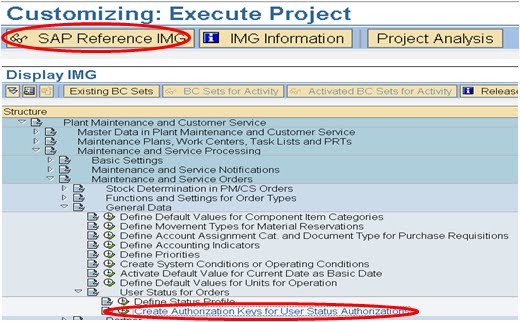
Create Authorization Keys for User Status Authorizations, processing
New entries, Input New User Status
Contoh AuthKey input : SUPERINT
Text input : Approved by Superintendent
Save
3.10 Perubahan / Penambahan Priority
dilakukan oleh Administrator SAP
Define Priorities, Processing
Pilih/Thick pada Define Priorities for Each Priority Type
New Entries, Input New Priority Type
Contoh di field PrTyp input : PM, field Prior : input E, field RelEnd : input 1,
field Priority text input : Emergency, field SDUn. Input : D, field EDUn input : D
Save
Selasa, 25 Januari 2011
F. Maintain Bill Of Material
3.11 Create Material BOM ( T-code cs01) 
Save
3.12 Create Equipment BOM (Transactional code : ib01) 
Save
3.13 Create Functional Location BOM (Transactional code : ib11) 
Save 
3.14 Penambahan Work Center ( Transaction Code ir01)
a. Tab basic data : Input Code New Work Center (contoh K1M117N)
b. Tab basic data : Input Description New Work Center
( contoh : DF PRWT MEK XXXXXX)
c. Tab default value : Input control key (contoh PD01)
d. Tab capacities : Input capacities category (contoh : 002)
e. Tab scheduling : Input capacities category (contoh : 002)
f. Tab costing : Input start date, controlling area, cost center (contoh: 113447)
contoh : input start date : 05.10.2010
controlling area : KGCO
Cost center : 113447 

Save
3.15 Penambahan Planner Group
Define Planner Group, Processing
New entries, Input New Planner Grpoup.
Save
Senin, 24 Januari 2011
G. Maintain TaskList FL
3.16 Create TaskList Func.Location (IA11)
1. Create Task List FL dilakukan oleh Planner di transaksi ia11
Isikan lokasi FL (misal : KR-600-E010), lalu input profile dgn 0000001, enter 
Ditab header, isikan deskripsi, isikan planner group (contoh K56), input System
Condition (contoh : S) kemudian enter.
Setelah itu masuk ke tab Operation.
Ditab Operation ini lakukan input :
a. Deskripsi operasi (contoh Inspeksi Motor, a. ukur tahanan isolasi dst)
b. Duration (contoh : 1)
c. No. yaitu jumlah eksekutor (contoh 2 ) 
d. Jika perlu dimasukkan komponen, blok operation no.0010 lalu klik
component di kiri bawah 
e. Input nomor komponen / sparepart (contoh SE5977000567)
Input quantity (contoh 6 )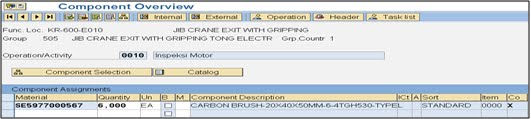
f. Jika diperlukan input Material PRT, lakukan dengan cara yang sama dgn
input komponen. (contoh OK7930000012), input quantity (contoh 1)
g. Save
3.17 Change TaskList Functional Location (IA12)
1. Change TaskList FL dilakukan oleh Planner di transaksi ia12
Lakukan input FL (contoh KR-600-E010), input profile (contoh : 0000001) 
2. Misal akan dilakukan perubahan di tab Operation (contoh : Ukur temperatur
bearing diubah menjadi Ukur temperatur bearing Drive Side)
3. Save
3.18 Display TaskList Functional Location (IA13)
1. Display TaskList FL bisa dilakukan oleh engineer, supervisor, supt, mng
ditransaksi ia13. Lakukan input FL yang akan dilihat TaskListnya
Contoh : KR-600-E010, input profile : 0000001, enter 
2. Di tab Header, bisa ditampilkan Workcenter, Planner group, status,
system condition seperti display berikut : 
3. Di Tab Operation bisa ditampilkan langkah kerja / tasklist, duration dan jumlah eksekutor seperti display berikut :
H. Maintain TaskList General
3.19 Create TaskList General (IA05)
1. Create Task List General dilakukan oleh Planner di transaksi ia05 Isikan profile dgn 0000001, enter3.19 Create TaskList General (IA05) 1. Create Task List General dilakukan oleh Planner di transaksi ia05 Isikan profile dgn 0000001, enter

2. Dari sistem akan dicreate nomor TL equipment internal (contoh : 141)
Lakukan input :
a. Deskripsi Task List (contoh : Inspeksi Motor AC)
b. Workcenter (contoh : K1E211A / CRM )
c. Planner Group (contoh : K51)
d. System Condition (contoh : S)

3. Ditab Operation lakukan input Urutan pekerjaan (contoh : Inspeksi Motor,
a. Ukur tahanan isolasi, b Ukur temperatur bearing ), input No eksekutor
(contoh : 2 ), input duration (contoh : 1)
a. Ukur tahanan isolasi, b Ukur temperatur bearing ), input No eksekutor
(contoh : 2 ), input duration (contoh : 1)

4. Save

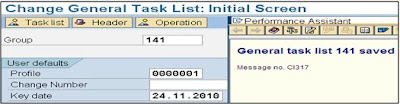
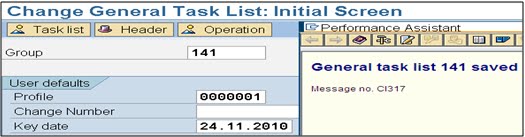
3.20 Change TaskList General (IA06)
1. Change TaskList General dilakukan oleh Planner di transaksi ia06
Lakukan input Group (contoh 141), input profile (contoh : 0000001)
1. Change TaskList General dilakukan oleh Planner di transaksi ia06
Lakukan input Group (contoh 141), input profile (contoh : 0000001)

2. Misalnya akan dilakukan perubahan deskripsi TaskList (contoh :
Inspeksi Motor AC diubah menjadi Inspeksi Motor DC)
Inspeksi Motor AC diubah menjadi Inspeksi Motor DC)

3. Save
3.21 Display TaskList General (IA07)
1. Display TaskList General bisa dilakukan oleh engineer, supervisor, supt, mng
ditransaksi ia07. Lakukan input no. tasklist / Group (contoh : 141)

2. Di tab Header, bisa ditampilkan Workcenter, Planner group, status,
system condition seperti display berikut :
system condition seperti display berikut :

3. Di Tab Operation bisa ditampilkan langkah kerja / tasklist, duration dan
jumlah eksekutor seperti display berikut :
jumlah eksekutor seperti display berikut :

Langganan:
Postingan (Atom)